How does smart business telephony work?
Our innovative features at a glance
With Zakelijketelefoonnummers.nl, you have all the features at your fingertips: easy setup, flexible adjustments, and full insight into your calls. This way, your telephony grows along with your business.
Curious about what our features include? And which ones can improve your organization’s communication? Scroll through this page to find out.
What’s included in the Self-employed Package?
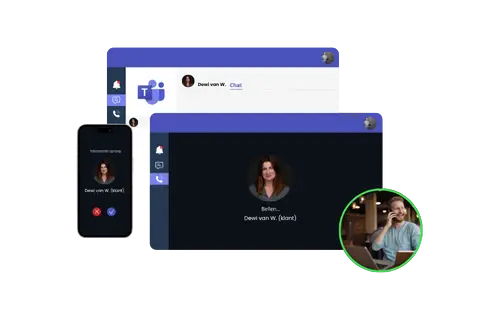
Forward to Microsoft Teams
Call via Teams without hardware
You can forward calls directly to Microsoft Teams. All you need is the add-on ‘Calling with Teams‘. No extra equipment like a PBX or SBC is required, and no additional licenses either. Just forward calls straight to your Teams environment.
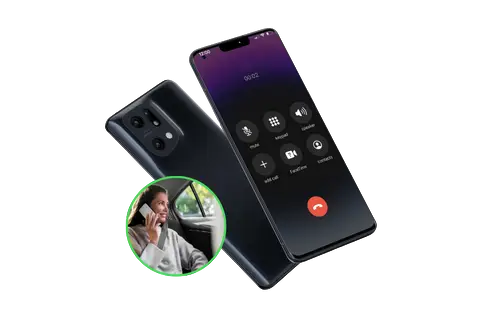
Landline number on mobile
Flexible call forwarding to any number
With our system, you can forward calls to any landline or mobile number anywhere in the world. This ensures you never miss an important call. Whether you’re working from the office, traveling, or using your mobile phone. We also offer international call forwarding, so you remain reachable even when you’re abroad. Our team is happy to handle the setup for you.
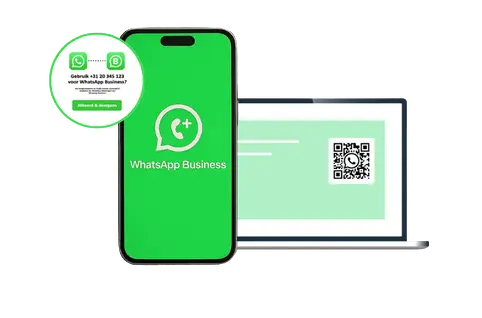
WhatsApp Business
Business calling AND chatting?
Enhance your communication setup by using our numbers with WhatsApp Business. Because WhatsApp accepts local, national, and mobile numbers, you can keep one unified business number for calls and messaging. Plus, WhatsApp Business can run on up to five devices for convenient team access.
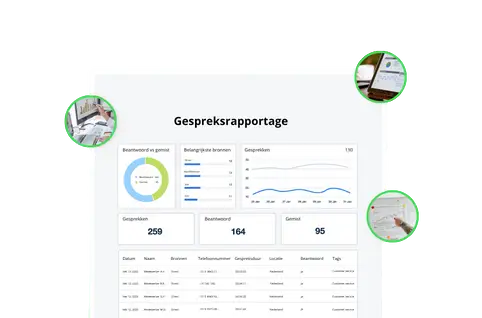
Call reports
Clear insight into your telephony usage
Access full call history for every incoming and outgoing call, giving you complete visibility into your communication activity. Our 18 available reports cover all key metrics, including call traffic, queue statistics, and more.
Call recordings
Save calls for training and security
Recording calls is a useful tool for reviewing conversations, tracking details, or logging agreements. The call recordings will be stored for three months. Your can turn recordings on or off at any time. Make sure callers are informed that the call is being recorded.
Hide caller ID
Protect the caller’s privacy
Normally, you can view the caller’s phone number. But for confidential scenarios, such as HR reporting, you may want to keep this information hidden. Simply activate this feature, and the caller’s number will be fully concealed.
What’s included in the SME Package?
This package includes all the features from the Self-employed Package AND…
Welcome message
You only make a first impression once
Greet callers with a custom welcome message. Typically, this might say “Welcome to…,” but you can also include additional information, such as a link to your website’s FAQ or updates about service outages. This helps callers get the information they need without speaking to anyone directly. Your welcome message is fully customizable and can be turned on or off at any time.
Opening hours and calendar
No more interruptions after closing time?
Set your business hours easily using the weekly calendar. Simply mark the days you’re closed, and if you make a mistake, we’ll correct it quickly. You can also add all official public holidays for your country.
Note: The calendar settings take priority over the weekly plan.
Queue, music and position indicator
A queue reduces missed calls
Never miss a call just because you’re temporarily unavailable. Our package offers many features:
- Choose from 25 types of free hold music
- Keep callers informed about their position in the queue
- Play (commercial) messages while callers wait
- Limit the number of callers in the queue
- Set the language for the position indicator
Blacklisting
With only one press
Some people love wasting your time. With a single press of a button (during or after a call), you can add these callers to your blacklist. From that moment on, calls from that number are blocked, so you can focus on what matters. You decide how long a number stays blocked.
Call menu
Save time for both caller and employee
We will set up the main menu for you, tailored to your company’s needs. You let us know which menu options you want to offer your callers, and we will make sure everything is configured properly. Each option can be adjusted or removed, so your call menu works exactly the way you need it to.
Caller information
Knowing right away why someone is calling
When your calls involve different topics, languages, or brands, playing a brief audio message before answering can be very helpful. For example, the message might say, “Topic X, English” enabling you to respond accurately to callers from the very first moment.
Colleagues on one number
Call with multiple mobile devices
With a single business phone number, you and your colleagues are always reachable. Each menu option can direct callers to a different destination. You can make and receive calls from one business number using a landline or multiple mobile devices, while keeping all personal phone numbers hidden from callers.
Call distribution options
Decide how calls are distributed among colleagues
Decide how calls are distributed among colleagues:
- Rotating: Calls are forwarded in the order you’ve set up with us.
- Longest waiting: Calls go to the colleague who has been waiting the longest without receiving a call.
- Ring all: All available colleagues’ phones ring simultaneously. As soon as one answers, the other phones stop ringing.
Working in call teams
For organizations with multiple departments
Does your team include colleagues with different tasks or areas of expertise? Call groups can help manage incoming calls efficiently. You can assign a single destination to a selected menu option, either an individual colleague or a group of colleagues across multiple devices. This ensures, for example, that calls about financial matters go directly to the finance department, not to sales.
Availability status
Taking time off? No problem
You can manage your availability status, which determines whether the phone number behind a selected menu option (final destination) is included in call distribution. By default, all final destinations are set to available. If you don’t update the status, every destination will automatically be included in the call distribution.
After-hours message
Avoid frustration for callers
Play an audio message for callers when your business is closed. Inform them of your opening hours and direct them to a website where they can find answers. Give callers the option to leave a voicemail while you’re closed. The voicemail is sent directly to one or more email addresses, making it easy to follow up.
Monitoring
Everything at a glance
With the real-time monitor, you can instantly see inbound traffic, your agents, and the queue. You immediately know who’s available, where it’s getting busy, and where adjustments are needed. This keeps everything running smoothly and gives you full control over your team and service. With just a few clicks, you have all the insights you need to respond quickly and keep the customer experience at its best.